Is it unreasonable to think Framework should be able to make a laptop competitive with the 5 years old MacBook Air M1? I get that Framework focuses on making repairable machines, but does that prevent them from making a fanless, hi dpi, good performing, long battery life machine?
I wouldn’t expect parity with an M4 machine, but it doesn’t seem unreasonable to think they should be competitive with the much older M1.
I have the same complaint with Lenovo (I usually buy ThinkPads). Where are the fast, fanless, hidpi, long battery life laptops?
> Is it unreasonable to think Framework should be able to make a laptop competitive with the 5 years old MacBook Air M1?
Kind of unreasonable. I mean which Intel or AMD cpu can be run fanless and perform well?
On the topic of displays, my understanding is that they "kind of use what they can get". That's how there can be a 13 display with rounded corners in a straight edge case.
What you're asking are the things I'm looking for, though still every time I go into their forum I see enough thermal, fan noise issues and AMD firmware bugs, that I'm still on the fence on buying one.
I wish them luck with the 12, for me sounds like a model for "true believers" because it doesn't seem to compete well enough with run of the mill chromebooks (or an Air) that are more established in the students segment.
It isn't the chip which determines whether it's fanless. Basically every modern chip supports power capping and then the power cap is determined by how much heat the machine can dissipate.
What that really determines is multi-thread performance. Fanless laptop that can dissipate the power of one core? No problem. Fanless laptop that can dissipate the power of all the cores? For that you have to lower the clock speed quite a bit. Which is why you see AMD chips on older TSMC process nodes getting better multithread performance than Apple's fanless ones.
The cost/benefit ratio of adding a fan is extremely attractive. The alternative way of doing it is to add more cores. If you have 8 fanless cores at 2 GHz, how do you improve multi-thread performance by 50%? Option one, clock them at 3 GHz, but now you need a fan; cost of fan ~$5. Option two, get 16 cores and cap them at 1.5 GHz to fit in the same power envelope, but now you need twice as much silicon, cost of twice as many cores $500+.
The number of people who pick the second option given that trade off is so small that hardly anybody even bothers to offer it.
Apple continues to do it because a) then they get to claim "see, they can't do this?" even when hardly anybody chooses that given the option, and b) then if you actually want the higher performance one from them, you're paying hundreds of dollars extra for more cores instead of $5 extra for the same one but with a fan in it.
If someone besides Apple made a fanless laptop that had competitive performance with Apple's offerings (i.e. not a $200 Chromebook with a Celeron or a cast-off 5 year old smartphone CPU), I'd absolutely buy one. I got excited when the Qualcomm Snapdragon X was being discussed pre-launch, but then it came out with performance worse than the original M1 and it turned out that Qualcomm lied about giving it first-class Linux support. I really dislike Mac OS, but when I can't use a PC laptop in bed or on a couch or on my lap without it overheating, I'm not able to switch away. It's a shame that the entire PC industry is fine with selling laptops that will overheat when not used on a rigid flat surface.
I mean, you could just buy something that allows you to configure the TDP in software and then set it low enough that the fan doesn't run. You'd be sacrificing a non-trivial amount of multi-thread performance, but that's what the fanless Macbooks are doing anyway.
Sure, and you can still find fanless devices, but then they'll typically be the ones not focused on multi-thread performance. And if you don't care about that, e.g. because you're offloading heavy workloads to a server or you just don't do anything compute heavy, then you can find a lot of fanless offerings with low core counts that are actually quite inexpensive. You can get some fanless Chromebooks for under $200.
It's a bit old at this point but the pixel slate chromebooks can be spec'ed with an i7 and 16GB of ram. I think they go for under 200 on ebay and are decent if you don't need compute heavy apps.
The per-core efficiency of Apple and AMD CPUs on the same process node is pretty much identical. This has become harder to directly compare because they're now using alternate process nodes from one another, but have a look at this chart for example:
What do we see at the top of this chart? TSMC 3nm (M3/M4), followed by TSMC 4nm (Ryzen 7000U/8000U), TSMC 5nm (M1/M2), TSMC 5nm/6nm mixed (Ryzen 7000H), and then finally we find something made on an Intel process node instead of TSMC.
The efficiency has more to do with the process node than which architecture it is.
It's too bad they don't have Epyc on that chart. Epyc 9845 is on TSMC N3E and that thing is running cores at a >2GHz base clock at less than 2.5W per core.
> The story is a lot more in favor of Apple if you look at single-core efficiency
Your link is comparing the M3 against AMD chips with higher TDPs. Higher TDPs tank "single-core efficiency" because power consumption is non-linear with clock speed. Give a core near its limit three times the power budget and you're basically dividing the single-core efficiency by three because you burn three times more power and barely improve single-thread performance at all, and then that's exactly what you see there.
To have a useful comparison you have to compare the efficiency of CPUs when they're set to use the same amount of power.
Ofcourse, but that's the whole point right? At similar power levels, Apple M-series is a lot faster. The only way for AMD and Intel to compete on performance is by providing more power, but this obviously has a negative effect on efficiency. So with AMD/Intel you have to choose: efficient and slow or inefficient and fast. With Apple you can actually have it both ways.
> Ofcourse, but that's the whole point right? At similar power levels, Apple M-series is a lot faster. The only way for AMD and Intel to compete on performance is by providing more power
They're saying the exact opposite of that. Their claim is that all the extra power is only juicing performance a little bit, so at similar power levels the performance is not all that far apart.
OK, so I'm still curious about the underlying efficiency. Is there a better test of single core efficiency at the same TDP? Does Apple Silicon provide any noticeable improvement over other x86 or Arm chips in that scenario, or is it really just a straightforward function of process and node size?
Someone needs to run the same single core benchmarks on Intel and AMD while forcing those CPUs to only use 5 watts. In a few minutes of searching I was not able to find anyone doing power-limited single core benchmarks.
> The number of people who pick the second option given that trade off is so small that hardly anybody even bothers to offer it.
The number of manufacturers or the number of people? Apple was on the path to laptop irrelevancy before the M series, it doesn't seem clear to me at all that people don't care about noise and heat along with performance.
People generally have a priority between noise and heat vs. performance. If you don't do compute-heavy stuff then you might as well have something quiet. If you do, i.e. you're always waiting on the machine, how many of those people want to sacrifice a third of their performance to avoid having a fan?
Performance along which characteristics?
How much performance does one need locally?
At which point does heat/noise/energy cost become too much for a mobile workstation?
All of these are additional criteria that the M series laptops competes in (and in many cases wins), even amongst programmers who are some of the most compute performance sensitive consumers out there.
Anecdotal, obviously, but disabling Turbo-Core [0] on my AMD Framework 13 stopped all of my fan noise and heat complaints, with no noticeable performance impacts. It went from being so loud that my wife on the other side of the room would ask if my computer was okay to quieter than my ThinkPad, and from noticeably hot to just slightly warm.
Kind of ridiculous that it takes messing with an obscure system file to resolve it, but not any more ridiculous than issues I've had with other brands.
[0] It's `echo 0 > /sys/devices/system/cpu/cpufreq/boost` or something like that, and `echo 1` to turn it back on when you want that extra performance.
You might not have noticed, but your single-core performance will take a serious hit if you disable turbo boost. For the AMD 7480u, turbo boost frequency is 5.1Ghz vs 3.3GHz base clock frequency. If you disable turbo boost you lose 36% single-core performance.
Intel's T variants in the Core series can be passively cooled. They have pretty good burst performance in case you need it. I don't know if there are laptops using them (I only have fanless desktop systems with these CPUs).
> which Intel or AMD cpu can be run fanless and perform well?
For example, AMD Ryzen 7 8840U or 7840U can be configured for the same 15W TDP as Apple M1. At 15W, the overall performance going to be about the same as M1.
> I mean which Intel or AMD cpu can be run fanless and perform well?
I don't follow CPU news and have no idea what lake they're at now, but I'd be surprised if Intel and AMD didn't have a chip competitive with an M1 by now.
When I google "fanless amd intel laptop cpu" I find this old thread https://news.ycombinator.com/item?id=31142209 which does suggest some fanless machines exist. That's from 3 years ago so surely there are even more options today, no?
> but does that prevent them from making a (...) hi dpi (...) machine?
It pretty much has that though? 1920x1200 at 12.2" is 185.59 PPI. Standard DPI (PPI) is 96. HiDPI to my knowledge isn't properly defined, but the usual convention is either double that or just more than that - the latter criteria this display definitely clears, and the former (192 PPI) is super super close, to the extent that I'd call it cleared for sure.
It's pretty hard to not clear at least the latter criteria on a laptop anyways. You'd see that on 720p and 768p units from like a decade or two ago.
The baseline of 96ppi is nominal only. Form factor and intended distance from screen matters a lot. In the laptop form factor, you’re aiming for more like 110–125 as 1×. Apple laptops range from 221–254ppi as 2×.
186ppi is designed for 1.5×, an uncomfortable space that makes perfection difficult-to-impossible, yet seems to have become unreasonably popular, given how poorly everything but Windows tends to handle it. (Microsoft have always had real fractional scaling; Apple doesn’t support it at all, downsampling; X11 is a total mess; Wayland is finally getting decent fractional scaling.)
Apple's HiDPI is "2x scaled" on Retina and >= 4k displays. But you can still pick a virtual resolution that isn't exactly 0.5x your display's native resolution, and it will look great.
For example my external monitor is 3840x2160, and has a default virtual resolution of "1920x1080", but I run it at "2304x1296". My 14" MBP display has a default virtual resolution of "1512x982", but I run it at "1352x878". Neither looks scaled, neither has a slow display, weird fonts or weird graphics. I never even really think about it. In other words, light years beyond the experience on Ubuntu and on Windows.
You omitted the next word in your quote, where I mentioned what Apple does—downsampling.
Your displays are high enough resolution that you may not notice the compromises being made, especially if you don’t get an opportunity to compare it with real fractional rendering, but the compromises are real, and pretty bad at lower resolutions. Pixel-perfect lines are unattainable to you, and that matters a lot in some things. And you might be shocked at how much crisper and better old, subpixel-enabled text rendering is on that same display.
Apple was in the position to do it right, better than anyone else. They decided deliberately to do it badly; they bet big on taking typical resolutions high enough that downsampling isn’t normally needed (though they shipped hardware that always needed such downsampling for some years!), and isn’t so painful when it is needed; and they’ve largely got away with it. I still disagree with them.
As for 1352×878, what on earth is that number, for a native 3024×1964 panel!? 2.237. It’s like they’re gloating about not caring about bad numbers and how terribly inconsistent they’re going to make single-pixel lines.
> Your displays are high enough resolution that you may not notice the compromises being made, especially if you don’t get an opportunity to compare it with real fractional rendering, but the compromises are real, and pretty bad at lower resolutions. Pixel-perfect lines are unattainable to you, and that matters a lot in some things. And you might be shocked at how much crisper and better old, subpixel-enabled text rendering is on that same display.
Do you have a test case where I can see this in action?
Nothing handy, sorry. For comparable results, you’d need to use an old version of Mac OS X. Up to 10.13, I think, if you can ensure subpixel text rendering is active.
Sorry, what I mean is, is there an image or PDF I can bring up that will show me imperfect lines on these displays?
As for rendering of text, there is definitely antialiasing in play. Subpixel rendering is no longer used, but I don't think you need it at these resolutions anyway. I'm not even sure what the subpixel arrangement is of my display (is it neat columns of R -> G -> B, or larger R and B with smaller but more numerous G? At 250-some PPI, the pixels are too small to notice or care!). But, I agree that if I was using my old 1920x1200 monitor I would miss it.
Yeah the focus really should be on multipliers. Is it a clean multiple of the typical “normal” DPI resolution for that screen size? You’ve got a great screen. No? It’s a compromise. Simple.
1.5x looks ok mostly (though fractional pixels can cause issues in a few circumstances), but across platforms nothing is handled as well as 2x, 3x, etc is. I have a 1.5x laptop and wish it were either 1x or 2x.
The appropriate display scaling multiplier for this screen is 200% (2x), which is exactly why I regarded it pretty much clearing even this bar. On Windows at least, you can only alter display scaling in 25% increments (this is also why application designers are requested to only feature display elements with pixel dimensions that are cleanly divisible by 4), and so the closest fit for this laptop's PPI will be exactly the 200% preset option.
Using a lower preset than this is trading PPI for screen real estate. I don't think that's reasonable to introduce into the equation here. Yes, you match the relative size of display elements by virtue of (potentially!) being closer to the screen, but in turn you put more of the screen into your periphery, just like with a monitor or a TV. I don't think that's a fair comparison at all. An immersive distance (40° hfov) for this display is at 37.1 cm (a foot and a bit) - I think that's about as close as one gets to their laptops typically already. This is pretty much the same field of view you'd ideally have at your monitor and TV too, so either you use this same preset on all of them, or we're not comparing apples to apples. Or you just really like to get closer to your laptop specifically, I suppose.
Nah, look at laptop norms for the last decade and it’s clearly targeting 1.5×, not 2×. Even more so given how small it is: you’ll aim for a lower scaling factor because otherwise you can’t fit anything on the screen.
There's PPI and then there's PPD. If they want more PPD (which is what's field of view and thus viewing distance and display size dependent), that's fine, but then it's not PPI they should be complaining about.
This might sound like a nitpick but I really don't mean it to be. These are proper well defined concepts and terms, so let's use them.
I wasn't thinking about the difference between PPI and PPD, so thanks for the clarification.
The bottom line is that I work with text (source code) all day long and I would rather read from a display with laser printer quality than one where I can see the pixels like an old dot matrix printer. Some displays are getting close to 300 DPI which is like a laser printer from 35 years ago.
I can definitely appreciate that. I just think it's important that people argue the right thing. It provides insight to the variables and mechanisms at play, and avoids people falsely giving rhetorical checkmates to each other, like I kind of did to you.
The brief version is that if someone has a screen real estate concern, they need to look for the PPI, but if they have a visual quality concern, they need to look for the PPD.
Maybe it will be elucidating if I describe a scenario where you will have low PPI but high PPD at the same time.
Consider a 48" 4K TV (where 4K is really just UHD, so 3840x2160). Such a display will have 91.79 PPI of pixel density, which is below even standard PPI (that being 96 PPI, as mentioned).
Despite this, the visual quality will be generally excellent: at the fairly typical and widely recommended 40° degree horizontal field of view, you're looking at 3840 / 40 = 96 PPD, well in excess of the original Retina standard (60 PPD), which is really just the 20/20 visual acuity measure. Hope this is insightful.
But nobody knows what baseline PPD is (47) and you can't actually specify a laptop screen in PPD, you can only specify it in PPI. So I think it's reasonable and maybe even preferable to use PPI here.
I can understanding finding it reasonable, it's just not getting at the heart of the problem.
It also introduces an element of uncertainty: as you say, you can't specify a laptop screen's PPD since that's dependent on viewing distance. But that's exactly the problem: it's dependent on viewing distance. Some people hunch over and look at their laptops up close and personal, others have it on a stand at a reasonable height and distance. To use PPI is to intentionally mask over this uncertainty, and start using ballpark measures people may or may not agree with without knowing.
To put it in context, for this display, "Retina resolution" (60 PPD), i.e. the 20/20 visual acuity threshold, is passed when viewed from 47.09 cm (18.54 inches, so basically a feet and a half). I don't know about you, but I think this is a very reasonable distance to view your laptop from, even if it's just 12.2" in diagonal. It corresponds to a horizontal field of view of 32°.
You could say it masks over the uncertainty in some ways, but it doesn't introduce that uncertainty. Asking for a laptop with 100PPD doesn't even make sense.
> Asking for a laptop with 100PPD doesn't even make sense.
Won't deny, since again, PPD depends on your field of view.
Yes, if you shop for "resolution and diagonal size", you may as well shop for PPI directly. This just doesn't generalize to displays overall (see my other comment with a TV example), as it's not actually the right variable. Wrong method, "right" result.
> The threshold for sharp edges is much finer, and the things we put on computer displays have a lot of sharp edges.
And the cell density is even finer. It was merely an example using a known reference value that lots of people would find excellent; I didn't mean to argue that it's the be-all end-all of vision. It's just 20/20.
PPI doesn't generalize across different types of display but it works pretty well within a category of monitor, laptop, tablet, phone. For TV you probably just assume it's 4K and figure out the size you like.
It's wrong but it's wrong in a way that causes minimal trouble and there's no better option. And if you add viewing distance explicitly, PPI+distance isn't meaningfully worse than PPD+distance, and people will understand PPI+distance better.
Eh, I suppose. Just the criteria of "is it hidpi? yes/no" readily mislead GP for example (i.e. it definitely is, just still "not hidpi enough"), so I felt it would be helpful if the mechanism at play was clarified. Maybe I came off too strong though. Felt it would be clearer to use the correct variable at least, than to try and relativize PPI.
I guess, but even without measuring pixel inches/degrees it feels clearly wrong to me to say that proper 1x on a 12 inch laptop screen is only 960x600. 1280x720 or 1280x800 makes more sense to me, and then there's no confusion because 1920 is a clear 1.5x resolution.
For what it's worth, it's a pretty small diagonal size. Netbooks used to be about this size, and those had exactly such low resolutions on them. Conversely, you'd see 1280x720, but especially 1366x786, more on regular variety laptops (~15"), and if you crunch the numbers for these (using standard ppi), it maps pretty much exactly right. So we've come a long way on Windows/Linux/BSD land, even if there's much more to go.
3840x2160@15.3" for example would be a nice even 3.0x display scale, at 287.96 PPI, and 128 PPD at 30° hfov to match the line pair resolving capability of the human eye [0] rather than the light dot resolving of 60 PPD, although of course still far from the 10x improvement over it via hyperacuity that you linked to earlier.
I accuse those 15 inch laptops of being below the bar. 15 inch should be 1600x900.
If 960xwhatever is okay at 12 inches, then 1366x768 wouldn't even be the baseline resolution for 15 inch laptops, it would be the baseline resolution for 17 inch laptops. That just sounds silly to me.
Assuming the laptop screen is just 20% closer goes a long way here to figuring out a good resolution. And it gives 720p to 12/13 inch laptops at 1x.
Windows' "real fractional scaling" gives me clipped window borders, maximized windows bleeding onto other screens, and fuzzy-looking applications. I'm curious if Apple's downsampling method works better, because I am not impressed with Microsoft's method.
Yes, it does. It always renders internally at 2x which means that's all applications have to support. Then it downsamples the final framebuffer to the resolution of the display.
I think the parent comment is referring to its parent's question "Is it unreasonable to think Framework should be able to make a laptop competitive with the 5 years old MacBook Air M1?"
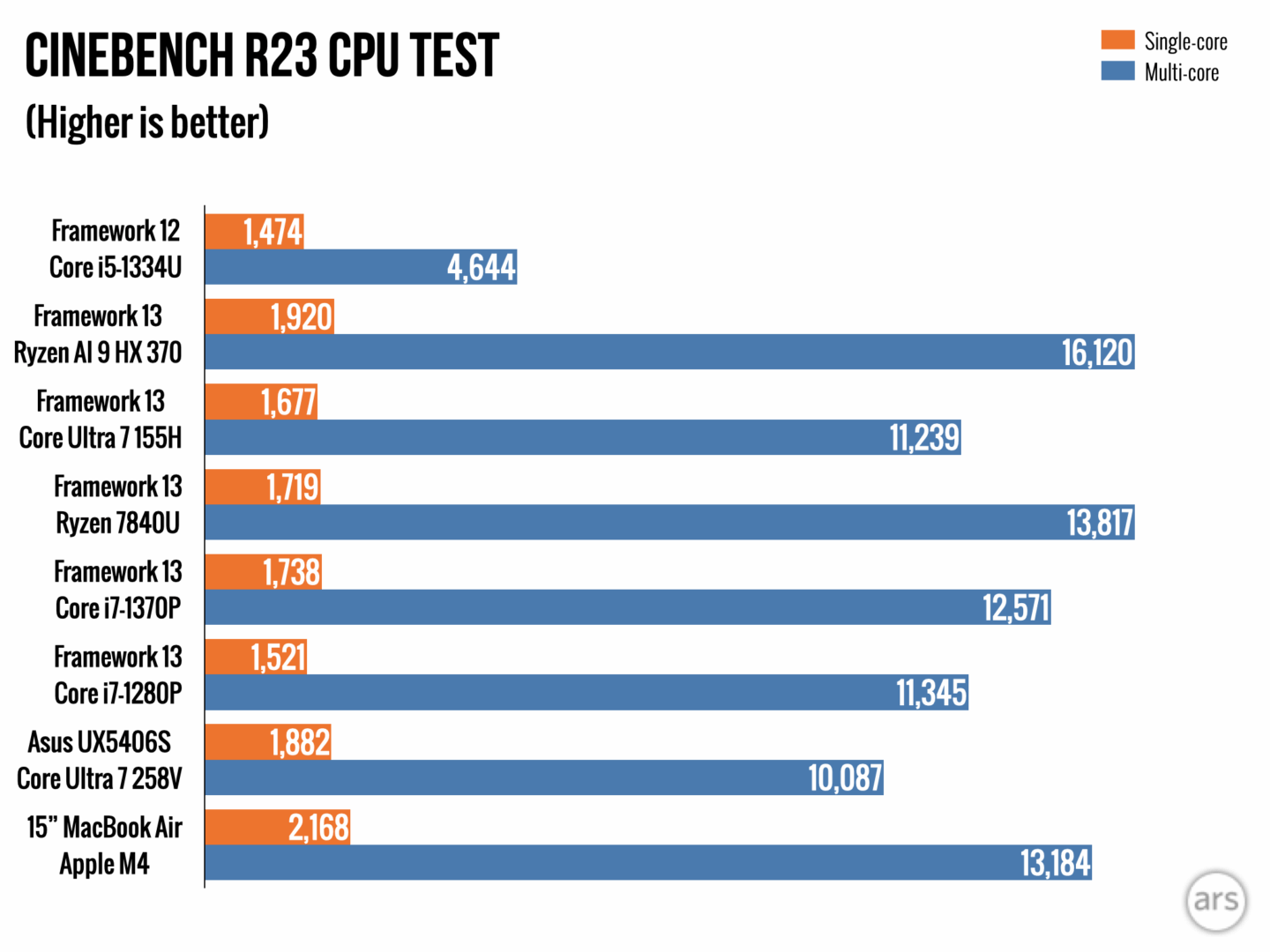
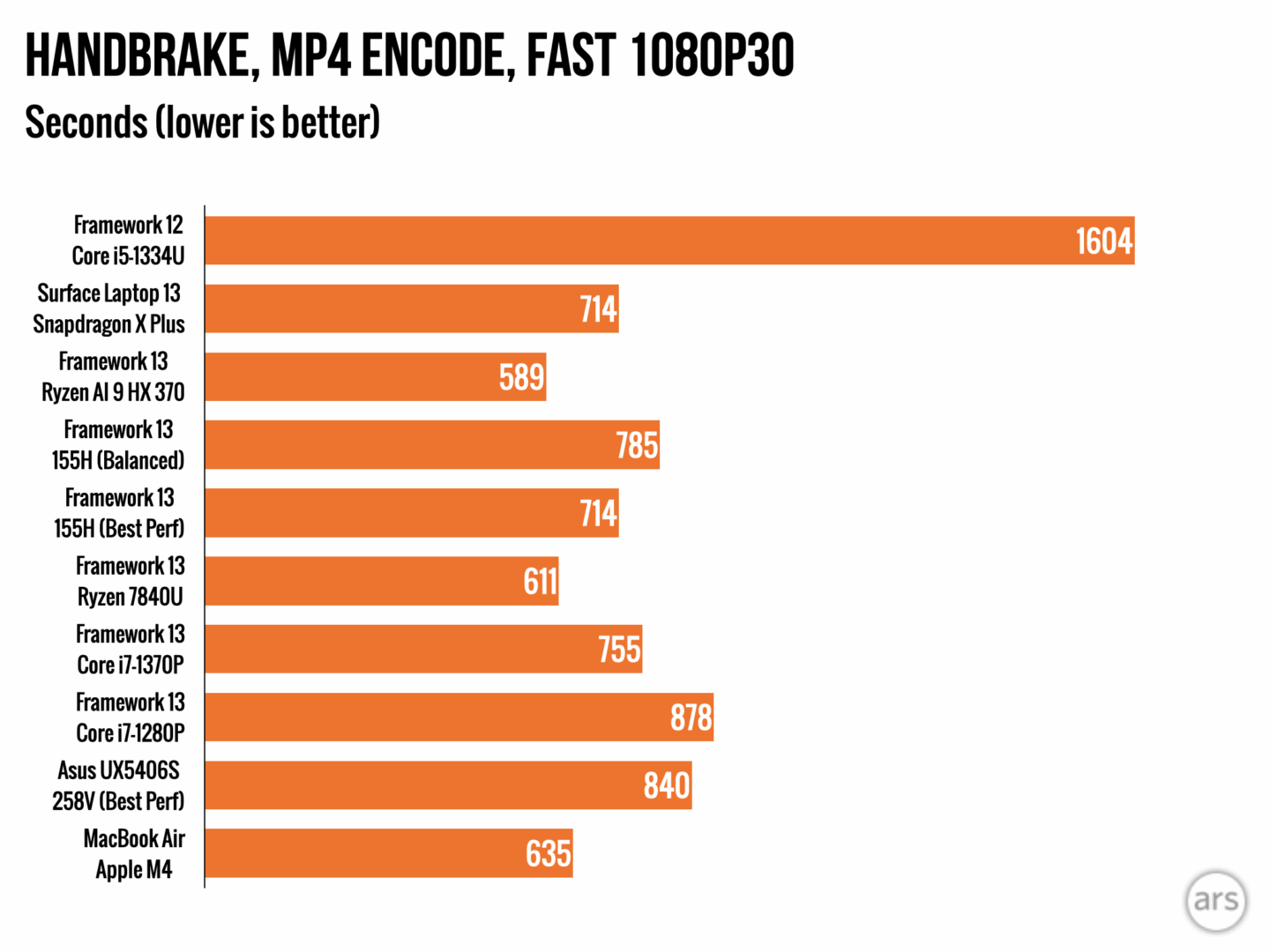
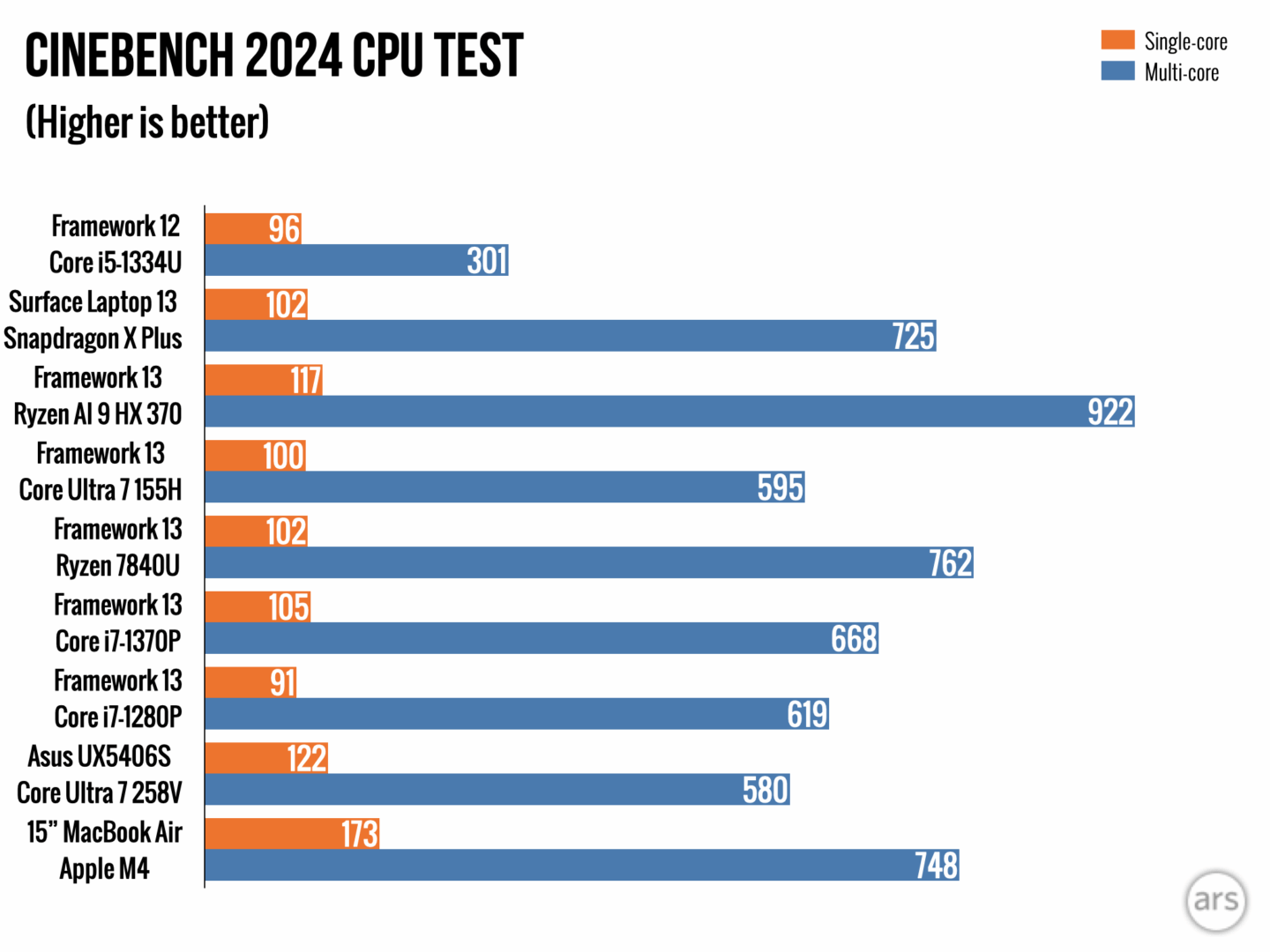
That the Framework 12 is not extremely lagging behind the M4 (subjective comparison) might lead one to believe that it would be competitive with an five year old M1 Air. Taking a quick look at "Cinebench R23" from 2020 [0], Macbook Air M1 comes in at 1,520 and 7,804, which compares favorably to 2025's "Cinebench R23" in which the Framework 12's i5-1334U scores 1,474 and 4,644.
The answer is it isn't competitive performance-wise. Given the M1 seems to have some native Linux support through Ashai, the Framework's advantages over the 5 year old MBA M1 seem to be user accessible hardware changes, touchscreen and longer hinge throw.
Except the M1 Air has no fan and will be dead silent doing that.
The framework won’t.
Once you get used to an inaudible laptop you really don’t want to go back. There’s nothing wrong with a fan you literally can’t hear without putting your head up against the laptop.
I would do anything to get rid of the hairdryers in my life pretending to be laptops.
The performance is great, and now there's a fully stable userspace graphics driver stack. Peripherials basically work. The battery life under load (i.e. development) is serviceable, not terrible, but in my (limited, "I turn on my laptop after some amount of time" testing) it's not even close to macOS especially when turned off. This is with a 13" M2 Air.
It's a really good Linux laptop if you can find a M2 somewhere, IMO.
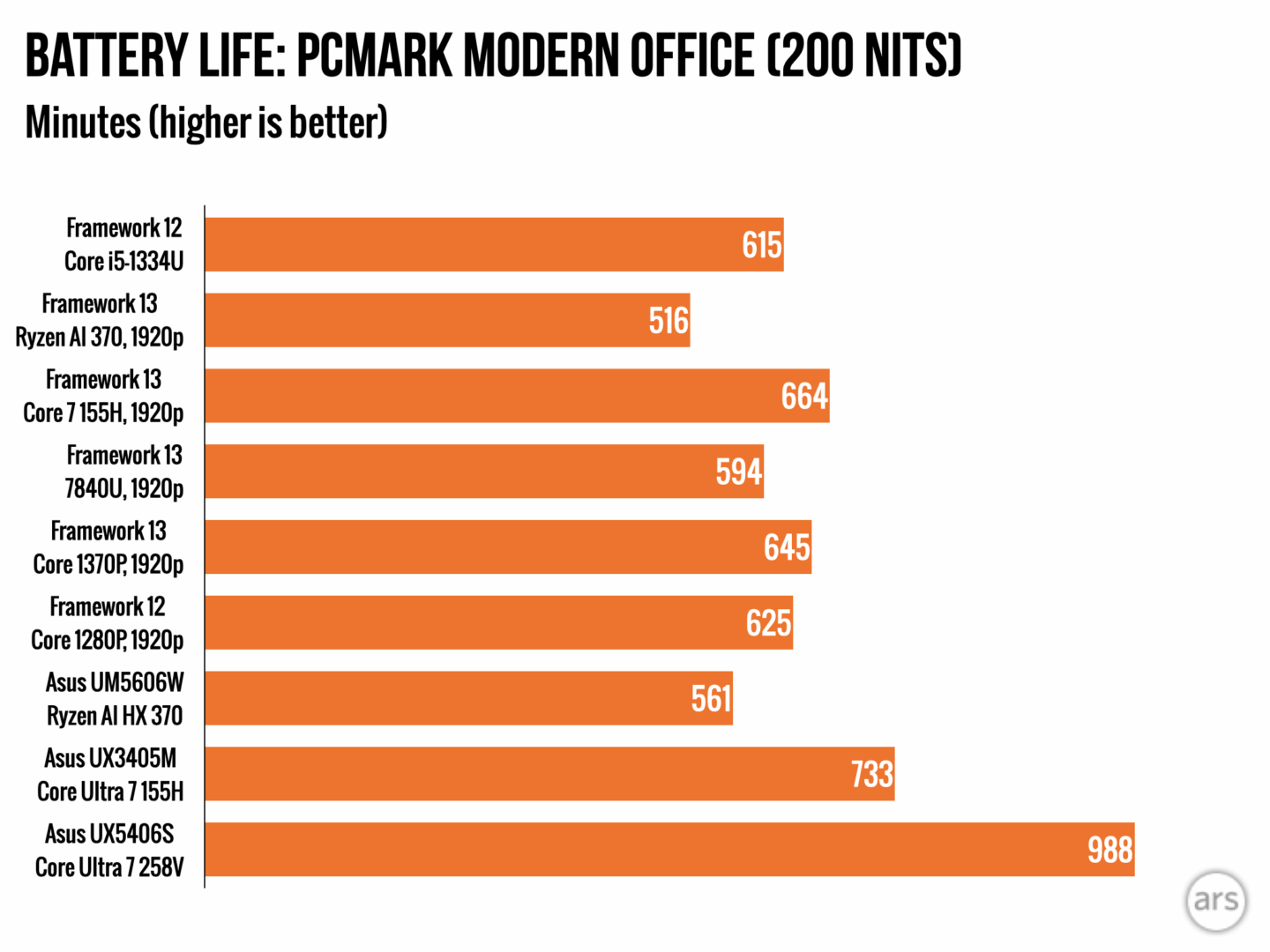
They didn't describe the full specs of their test rigs (that I saw) but a similarly spec'd Macbook Air is going to get better battery life than the equivalent Framework 12 or 13 based on the 10 hours they quoted for the 12. (The 13 gets even less). And saying that the best possible CPU framework offers in a 13 inch format beats the consumer line of Macbooks.. sometimes.. you would really need to like/need Linux. At which point, get the cheapest Macbook Air M4 you can and then just use the money you save to get a decent NUC.
There are many different methods through which one can develop against/on Linux. For example, I have a pretty low spec'd Macbook Air and several different test machines at home that I do remote development against. I prefer a low-heat, high battery life, good performing machine like the Air over a power hungry, loud, and constantly overheating workstation. But, those are my preferences -- some people want to have a single interface through which they do all their work, and the most powerful Linux laptop money can buy. If that's the case, Framework is great!
Exactly that is what I think, and I do think it is just not possible.
I’m searching for a new laptop, I want unix, so either linux or macos. I was looking at framework, system76, tuxedo and slimbooks, and mac air. I want an ANSI keyboard, which seems an oddity in Europe (there is English iso, which viscerally hate)
If you want thunderbolt ports, and some good specs, mac air is cheaper. And I’ve heard with arm processors you can tun linux at almost native speeds… I’m almost decided for Mac Air…
If somebody wants to add something to make me change my mind, you are more than welcome.
BTW I’m replacing a 2016 Macbook pro, which was buggy as hell, and I learned to really hate it. Also I’m not a fan of MacOs… but !4$ I cannot beat it.
Hah, my problem with ASUS is that they don't offer proper ISO keyboards in Europe. (Their left Shift key is short, but the Return key is wide.) I really don't know what they are doing with their keyboard layouts.
And that's actually the reason why I'm lurking in this thread; I want a 2-in-1 and didn't get the X13 Flow due to its keyboard.
The MacBook Air is undoubtedly good hardware, even good value, but from experience I personally just hate the Apple software ecosystem/wardship so much, it’s a dealbreaker. The pretentious presentation while neglecting practical details, the inflexibility you will sooner or later fight… it’s a special kind of hell. You strictly don’t have options on their devices. Asahi is a nice effort, but still too limited. The happy Apple users I know, have adapted their expectations, bought fully in. I am honestly never sure, if they are merely fantasizing about productivity, or actually (just) work. For me, after the honeymoon phase, it always ends in deep frustration. IMO with Apple you have to embrace the "yes, daddy“ mentality, be gaslit into overstating the good, while disowning the bad, or you will end up angry.
In The Netherlands ANSI is the most common keyboard layout, so you might want to look there if you really want/need ANSI. Only Apple and Logitech are outliers and insist on ISO.
Yes we all use ANSI. Only difference with US keyboards are Alt Gr key instead of right Alt, and a € sign on the "5" key. I think both are not really dealbreakers.
Lenovo X9 Aura is pretty great. 80 Wh battery which gives you 6-10 hours of usage, 15’’ 120 Hz 3k OLED screen, new 3 nm Intel CPUs. Only half as fast as my M4 but less than one third the price, with an upgradable SSD and a customer-replaceable battery. My only gripes are the soldered 32 GB of RAM and that they only put one USB C connector on each side, otherwise a tremendously good machine for that price. I think it has a fan, haven’t noticed it yet though.
I guess. MBP is in the same ball park, it uses around 5-8 W when idle with the screen on, it’s just that the 16’’ model has a 100 Wh battery so naturally it lasts longer. On Windows the Lenovo apparently lasts as long as a MacBook but I use it on Linux where power management isn’t as well optimized, it idles at around 9 W.
I don’t get these comments in general, sure the MacBook is much better, and I use one as well. I still prefer native Linux on my machine sometimes and the Aura is probably the best Linux laptop I ever owned.
What? You can get an M4 MacBook Air with 32 GB of RAM for $1400, and from googling the X9 Aura is the same price. How is that "less than one third the price"?
I have the MBP M4 Max with 48 GB and 2 TB drive, which is around 5.500 € here. That’s what I compare it to, it has around 40.000 points on Geekbench, the X9 around 20.000 and it was around 2.000 €. Not sure how the other M4 compare. And sure the MBP or the Air is of course the better machine if you want to run MacOS, for a Linux laptop the Aura is the best option now though.
Good point. They don’t really seem to care about actual user needs — their products feel more like they’re built around what’s easy to implement. I would’ve loved to see a Snapdragon motherboard focused on battery life and quiet operation too.
And M1 laptops are what about three years from the vintage list? They'll be e-waste at the end of this decade even while other laptops fail to match it.
It's lifespan is practically defined by how long it gets security updates after Apple obsoletes it, and your ability to install other operating systems when that ends - there is only Asahi Linux, and Asahi is still figuring out M1 support.
The only way Framework is going to match that is if they take charge of the operating system and probably the CPU design too so they can eke out every bit of performance - which is certainly possible these days, a lot of companies are doing exactly that - but I believe it requires billions in investment!
There isn't any CPU that is competitive with the Apple M series. Maybe regulators will force Apple to sell the M series chips to competitors, if not, it is what it is.
The Apple M-series laptops get a performance boost by putting the RAM inside the CPU, which makes it completely impossible to upgrade RAM. That is the antithesis of what Framework is doing. Apple are the kings of disposable hardware that costs way more than the competition for no good reason. You want 32GB? You're going to pay a lot for it. Oh, now you need 64GB? Too bad, throw out that old laptop and get a new one.
The fact is that the CPU and the RAM are in the same package. Yes, essentially the RAM is on the CPU for the purpose of this conversation about upgradeability. You cannot upgrade the RAM in any M-series Apple computer, not even desktops.
There is a lot you can fault Apple for, but we're literally talking about a 4 year old CPU that is still unmatched by their competition. People often argue "how much is Apple ahead of the competition" if at all, right? Guessing you're in the "not at all, it's all PR bullshit" camp, which is fine.
This is the one undisputed example though where we can put a definitive number on it. So far Apple is 4 years ahead of their competition on this very particular metric (High performance, low energy, fanless CPU)
>a 4 year old CPU that is still unmatched by their competition
It isn't all that high performance compared to other laptops, but sure.. fanless and low power it has. I just would rather plug in a laptop to get my workload done in 1/2 of the time it would take on an M1 laptop.
The Dell laptop we got runs at 55W (Intel Core i9-13900HX) and is faster than the M1 Ultra 20-core at 60 Watts, which you can't even get in a laptop format. The benchmarks don't lie. That intel CPU is as fast as the fastest M4 16-core CPU, and the M4 runs at 90W (so far as I can tell from a google search).
>Guessing you're in the "not at all, it's all PR bullshit" camp, which is fine.
I'm guessing you're in the "reality distortion field" camp. Nevermind, I know you are.
We understand that if you are willing to compromise on the fan and power efficiency, you can get a great machine like your Dell. People with your preferences are well served! The frustration is that there's nothing similar to even an old M1 laptop from other manufacturers. Why not? Apple has shown there's a big market for small, efficient, silent laptops with good displays in the $2500+ range.
Other people in this thread have mentioned a Lenovo Aura as coming pretty close and it does, except for the fan! Is it really that hard to eliminate the fan and get performance / watt numbers like Apple was getting 5 years ago?
In Apple's quest for thinness and quiet they have made lots of undercooled devices that overheat and thermal-throttle and just plain die. That Dell replaced a MBP which replaced another MBP that had to have the motherboard replace 8 times before Apple forced us to sue them in a class action (and we won). If only they had just cooled the thing properly.
>there's a big market for small, efficient, silent laptops with good displays in the $2500+ range.
Yeah, it's called "apple fanboys", people with more money than sense who fetishize slimness and quiet over computing.
The Dell costs less than half the price of a $2500 fanless Apple laptop, so it's really no wonder Apple is forever at ~15% market share - most people prefer to not spend their money on Apple hardware. Price/performance is not what Apple is known for, they are a luxury brand, a status symbol. And that's great if that's what you need, Apple makes a laptop for you.
Assuming everything you say is correct, there are a lot of people with more money than sense. Why is Apple the only company to chase that market?
Apple’s margins are the envy of the industry. Their stores have revenue per square foot numbers that few other retailers can match. Why isn’t there a Dell store across the street from every Apple store? Why doesn’t HP have a machine that goes toe-to-toe with every SKU that Apple sells?
> Apple makes a laptop for you
And, unfortunately, only Apple is making a laptop with those characteristics. My laptop is a ThinkPad because I need Windows and it’s not a very nice computer to use. There’s lots of Linux and Windows people out there who want Apple-like hardware. Some companies copy the superficial aspects, but none copy the internals.
I guess ultimately what I was trying to get at this whole thread is that Framework could make an M1-level machine, right? They just choose not to.
Nobody wants to run Windows on ARM. The software base just isn't there. Framework could make a fanless ARM-based laptop, but few people want those.
We were stuck with a perfectly good x86 MBP that Apple no longer supports, and we had the choice of buying an M-series Apple or buying the Dell. We went for the far cheaper and more powerful option, with a far larger softtware base. Most people do the same.
Apple stores are a place for fanboys to spend money, the stores are part of the corporate luxury persona. Dell and other PC manufacturers don't need retail stores in the age of the internet. And again, Apple is a luxury brand charging luxury prices, it's no wonder fanboys spend a lot of money at their stores, their identity and self-worth depend on it.
No, nobody wants Windows on ARM. At least not until Microsoft gets something like Rosetta up and running.
This whole thread has been about wanting an x86 version of the M1. Intel and AMD have made some great CPUs that should be capable or running fanless and be competitive with five year old Apple computers, right? Since they are older CPUs now, they should be very inexpensive as well.
I don't own an macOS device, but anytime a family member asks me what to get, I tell them to get a Mac because they can go to the mall and either take a class or schedule an appointment for one-on-one help. That's the real value of the Apple store.
I have a hard time taking the luxury brand charge against Apple seriously. The Apple Store is a luxury store in the same way that Applebees is a luxury restaurant compared to Burger King. Nothing they sell is hard to get, nothing is significantly more expensive than what the competition sells (especially if you value in in-store support and resale value), and everything they sell is extraordinarily common, at least in the US. Nobody sees an iPhone or MacBook Air and thinks "oooh! fancy!".
The exception is probably AR device, which is kind of ridiculous.
"Repairable" is a bit of a fool's errand. It really hinges on availability of spare parts, supply chain, etc. They will never sell enough of this niche product to nerds to make that a long-term reality.
An old MBP is far more repairable because so many were made there will never be a shortage of parts on eBay.
While an emphasis on repairability is noble, the false prophet of brick-like pluggable USB modules ain't it.
The newest Apple laptops all have easily replaceable ports that do not require replacing the logic board, so that novelty is even more useless.
I'm far more likely to buy a RAM stick off the shelf and install it in a Framework than I am to desolder the RAM from a Macbook.
Similarly, if I spill orange juice on a Framework, I can just buy a new keyboard and install it in a minute. If it were a Macbook, I'd probably throw away the whole thing, since I'd have to disassemble all of it to get to the keyboard, and it would take me hours, if I even managed to not break something.
So, "Macbooks are more repairable than Frameworks" is quite the take.
Or, upon spilling the juice, realize you can get a Surface Go on sale at Walmart (which this seems to be a clone of) for a bit more than a replacement keyboard and your time (which is way more than a minute) and toss it in the trash anyway.
It really doesn't seem like you're trying to engage constructively here.
Framework sells keyboards for the Framework 13 for ~$30. I can find a Surface Go on sale for as low as $500.
No, I don't think anyone's going to throw out a $500-$1000 device because it needs a $30 part and maybe 15 minutes of work (steps here: https://www.ifixit.com/Guide/Framework+Laptop+12+Input+Cover...) and they could instead replace their laptop with a tablet for a mere $470 more.
> It really doesn't seem like you're trying to engage constructively here.
So I'm not allowed to disagree? For the record: I think the Framework laptop, while a noble cause, is a foolish endeavor as executed and they will be out of business in 5 years.
I'm assuming you've stocked spare parts because by the time you need a new keyboard, there is a chance they will be out of production (or out of business) and those parts, now rare, will be fetching $100s on eBay.
> So I'm not allowed to disagree? For the record: I think the Framework laptop, while a noble cause, is a foolish endeavor as executed and they will be out of business in 5 years.
:shrug: people said the same thing when I first bought my laptop 4 years ago. Parts are readily available today, and I expect them to be so in a year.
If nine years after I bought the laptop I can't get a replacement keyboard, I'll be a bit disappointed that the project failed, but the laptop will easily be net-positive from a cost benefit perspective long before that
FrameWork is not openly hostile towards right-to-repair, and do not actively sabotage repair efforts. Try calling Apple and ask for spare parts or circuit diagrams. Anything you find is either leaked, cloned/copied or trash-picked. It barely qualifies as spare parts.
>"Repairable" is a bit of a fool's errand. It really hinges on availability of spare parts, supply chain, etc. They will never sell enough of this niche product to nerds to make that a long-term reality.
I don't think that's the case - there are plenty of people who realise that eWaste is a problem, and I've lost count of the number of times I've been asked why a laptop can't just have a "new CPU" fitted to speed it up when everything else works. In reality this means a new system board, but Framework does this.
>An old MBP is far more repairable because so many were made there will never be a shortage of parts on eBay.
That's not comparing like with like. I've done a -lot- of fixing of old (2012-era) macbooks and secondhand parts are always a crap shoot. Plus there are lots of minor changes between otherwise identical-looking parts which mean they don't fit (such as the higher-DPI screen connector between 2011 and 2012 for otherwise identical-looking parts which are indistinguishable until it doesn't quite fit.
>While an emphasis on repairability is noble, the false prophet of brick-like pluggable USB modules ain't it.
That's adaptability and means you can get the IO you need. The computer could be entirely non-repairable and have this, or it could be framework where everything is available brand new as a spare part if you need it.
>The newest Apple laptops all have easily replaceable ports that do not require replacing the logic board, so that novelty is even more useless.
I think you might be misinformed here. Lots of stuff is now serial locked and won't work even if you swap it over. And that's not counting some of the terrible low-level engineering stuff which people like Louis Rossman highlight (such as placement of higher-voltage lines right next to direct-to-cpu lines in display connectors). And I'm sure you know about the simple voltage controller that fails that Apple won't allow the original supplier to sell to anyone else.
Even replacing the battery in my 2022 MBP (which I'm using now and absolutely love) would be a trial compared to the framework. One of the USB ports has always been dicky and I've just left it as is precisely because this is a can of worms.
Watch some dosdude1 repair videos of examples of how much work and skill is needed to do something such as upgrade the storage in a MBP/Air. And compare this to the framework. They are several orders of magnitude different in terms of skill level.
If you go to the Framework website you can still find spare parts for their first gen laptops, because one thing they did is make sure that the latest gen parts are still compatible with their first gen.
Also, on a Mac if the memory or storage dies, you need to replace the whole motherboard, that isn't true in a Framework laptop. You can't even say that those parts will be difficult to get in the future because they're off the shelf parts.
I will not even start on the fact that replacing other parts that commonly break in a laptop like the screen or the keyboard are hard to do in a MacBook (needs to disassemble almost the whole laptop) vs doing it in Framework that is much easier and probably takes 20 minutes even without experience.
I had a usb dock that surged, destroying the dock and my touchpad. A $25 replacement from framework, and under 5 minutes to swap things out, and I was good as new!


I wouldn’t expect parity with an M4 machine, but it doesn’t seem unreasonable to think they should be competitive with the much older M1.
I have the same complaint with Lenovo (I usually buy ThinkPads). Where are the fast, fanless, hidpi, long battery life laptops?