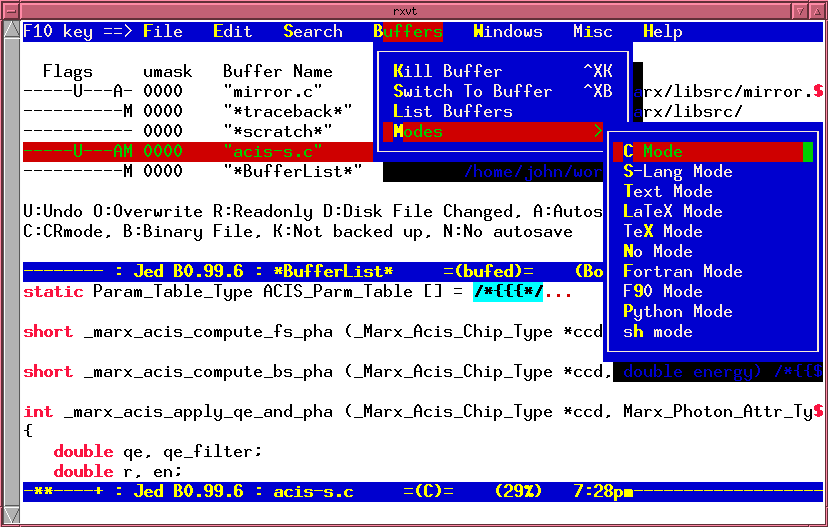
Somewhere around 1994, I used to dial into the university's terminal server using a Wyse 370 and a 9600 baud modem. (Note, this was not PPP or SLIP providing TCP/IP. You had to type the atdt modem commands directly...) This particular terminal had 64 colors as an extension to the VT100 command sequences. I sent an email to John E Davis asking if he'd be willing to add support for my one off color capability, and he did! Super nice guy, and JED was one of the first things I compiled on every new Unix account I got for several years after that. I was very happy with very colorful source code.
I remember JED! When I started out on Linux in 1997 (coming from DOS/Windows) I was forced to choose an editor. There was Pico which was specific to the `pine` e-mailer (this was before nano), and of course vi and emacs.
I didn't want to invest the time to learn vi or emacs so I used JED for a while, and it served me well. But coming from DOS, JED still had a bit of a learning curve. I figured if I was going to pick up a totally foreign editor, I should probably just bite the bullet and learn vi or emacs.
I settled on vi(m) eventually and never looked back. JED helped me make the transition though.
There was also an editor JOE which had Turbo C keybindings. That would have been a great fit for DOS heads like me but I learned about it too late. The ship had sailed. (it's just as well -- I now have vim muscle memory, which is far more useful)
Joe is still around, and actually quite usable/performant. If it's invoked as "jstar", it gets even closer to WordStar/TurboPascal keybindings. It can also do "jmacs" which has Emacs keybindings, the default "joe" configuration being something in between.
Does syntax highlighting, incremental search, regexes, and all that pretty fast.
If we're talking old DOS editors, JED actually has a quite decent BRIEF emulation.
Having a strong Turbo Pascal background, with liberal use of EDIT.COM as my "IDE" for Turbo Assembler, joe was a welcome replacement dir vi when I really started getting into Linux back in the 90s. I still have it loaded on a couple of boxes today. The key bindings are so familiar and "comfortable".
I don't use JED but I do use `most` from time to time, as a replacement for the `less` pager. I like the keybindings better. Apparently, it is implemented with S-Lang too.
SLRN used to be be a pretty popular newsreader implemented with S-Lang, never mind that S-Lang, sans the language part, was a quite common alternative to ncurses as a terminal interface.
The language itself is... interesting. C-like, but with some array-based constructs and quite a large amount of backwards compatibility -- there's a "_for" statement and default arguments are weird, as they're not mentioned in the prototype, but just done in the main body. It's a bit like Perl, but without the logic.
Well, it's more like a weird mix of Emacs and old borland/ms IDE's. The menubar is great (and Emacs should just look like that by default, IMO), but overall it's missing useful cues like scrollbars and titlebars. The minibuffer-like area at the bottom looks a bit weird, whereas it could easily be reskinned as an "expanded" status bar, for consistency with the classic TUI/GUI look.
I used to work at a very small network engineering shop where JED was the primary terminal editor used (mainly because it was the CTO's flavor of choice). It's lightweight and easy to learn with Emacs keybindings, but I'd never use it for doing anything more than quick edits and scripting.
These days, though, an editor not providing Vim emulation pretty much counts it out for me
JED is a text editor that makes extensive use of the S-Lang library. It is highly cross-platform compatible; JED runs on Windows and all flavors on Linux and Unix. Older versions are available for DOS. It is also very lightweight (meaning very parsimonious in its use of system resources), which makes it an ideal editor for older systems, embedded systems, etc. JED's Emacs mode is one of the most faithful emulations available.
The thing which I wish was easy is having ssh pass enough things forward (and backward) that you can ssh somewhere, run emacsclient on a file and have that file show up (via tramp) in your emacs.
It’s just about possible but hard and hacks and not really supported by ssh.
I've been using Jed as my primary editor for the past 20 years.
Originally because it was faster than Emacs while providing the same experience.
Then because I loved how its automatic indentation works ("tab" properly indents the current line), and I still can hardly use an editor that doesn't behave in a similar way.
Finally, the language extensions are written in ("slang") is great. It feels familiar, is readable and is easy to pickup, unlike Emacs Lisp.
Jed and Piknik are the two first things I install on any new computer.
Today, in order to write Rust code, I use VSCode, but for everything else, Jed remains my go to editor.
Used JED in the 90s to 00s until nano became a default lightweight editor. Was a lot faster to start for small edits than Emacs. Really liked the editor.
The thing with emacs is that you normally wouldn’t “start for small edits.” Rather, you’d start it early in the morning and close it late at night (if ever).
That's a blast from the past; I remember using this in the 90s as a programming editor for the HP100lx pocket computer (a 186 running MS-DOS5). Quite zippy even on that limited hardware.
It was my go to for a long time for editing over ssh. I eventually broke down and learned enough vi to get by, but jed has zero learning curve and syntax highlighted everything without installing packages